
Town Tech · Call or text 863-288-0123 · 217 Main Street, Auburndale, FL 33823
How to check for windows updates
Simple steps with a picture: how to check for Windows updates.
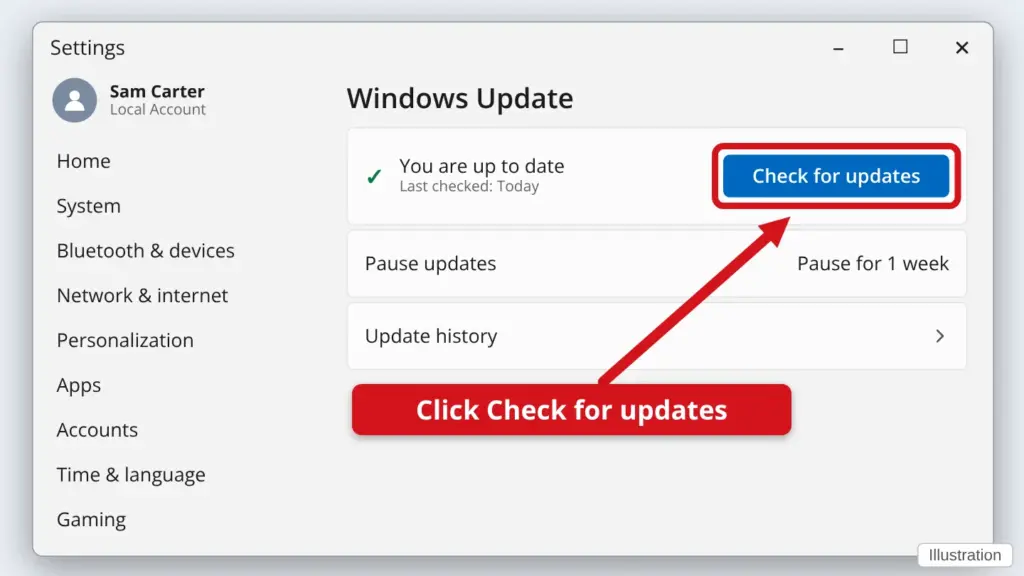
- Click Start, then Settings (the gear).
- Click Windows Update. On Windows 10, click Update & Security, then Windows Update.
- Click Check for updates. Wait while Windows looks. It can take a few minutes.
- If it asks you to restart, save your work first, then click Restart now. Do not turn the computer off while it says Installing or Updating.
Updates keep your computer safe and working well.
Stuck? Call or text Town Tech at 863-288-0123. We are happy to help.
Find this guide online: townlearn.com/how-to-check-for-windows-updates/
Still stuck? Call or text Town Tech: 863-288-0123 (Tue–Fri, 10 AM–4 PM)
Still stuck? Call or text Town Tech: 863-288-0123 (Tue–Fri, 10 AM–4 PM)