
Town Tech · Call or text 863-288-0123 · 217 Main Street, Auburndale, FL 33823
How to change desktop background
Simple steps with a picture: how to change the desktop background.
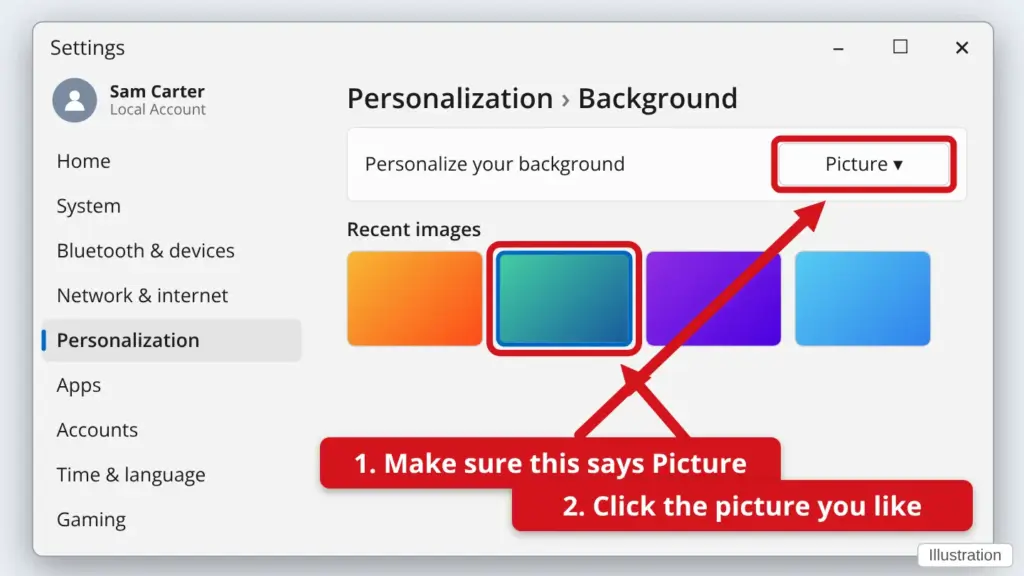
- Click Start, then Settings (the gear), then Personalization. A quick way: right-click an empty spot on your desktop and click Personalize.
- Click Background.
- Next to Personalize your background, make sure it says Picture.
- Click a picture you like. To use one of your own, click Browse photos and choose it. Your desktop changes right away.
You can change it as often as you like.
Stuck? Call or text Town Tech at 863-288-0123. We are happy to help.
Find this guide online: townlearn.com/how-to-change-desktop-background/
Still stuck? Call or text Town Tech: 863-288-0123 (Tue–Fri, 10 AM–4 PM)
Still stuck? Call or text Town Tech: 863-288-0123 (Tue–Fri, 10 AM–4 PM)