
Town Tech · Call or text 863-288-0123 · 217 Main Street, Auburndale, FL 33823
How to change your default web browser
Simple steps with a picture: how to change your default web browser.
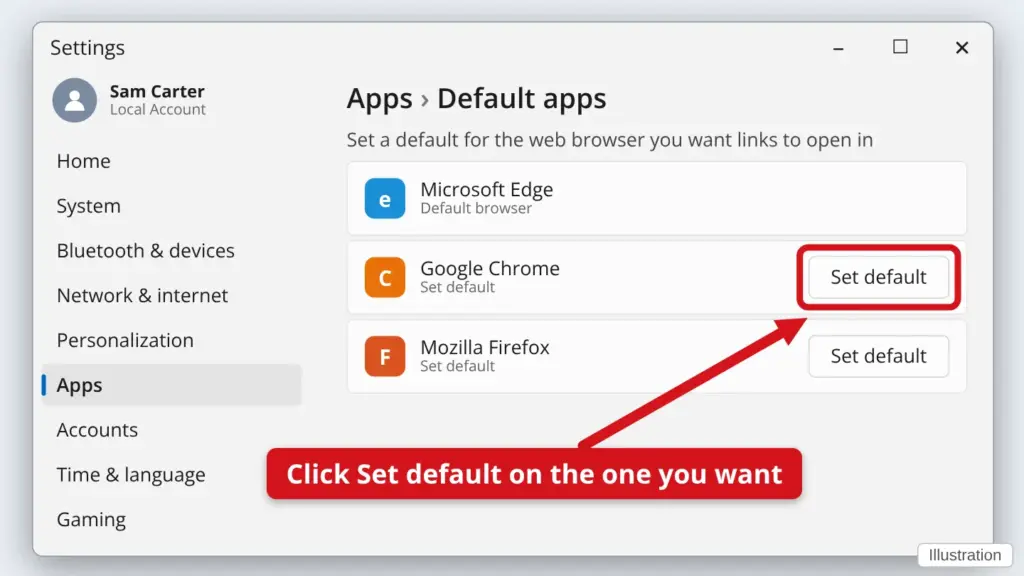
- Click Start, then Settings (the gear), then Apps.
- Click Default apps.
- Click the web browser you want, such as Google Chrome, Microsoft Edge or Firefox. On Windows 10, click Web browser and pick one from the list.
- Click Set default. Now links you click will open in that browser.
Windows may ask you to confirm. Pick the browser you chose.
Stuck? Call or text Town Tech at 863-288-0123. We are happy to help.
Find this guide online: townlearn.com/how-to-change-your-default-web-browser/
Still stuck? Call or text Town Tech: 863-288-0123 (Tue–Fri, 10 AM–4 PM)
Still stuck? Call or text Town Tech: 863-288-0123 (Tue–Fri, 10 AM–4 PM)